Subby for Android
Subby is a subscription tracker for Android, on Google Play since December 2017. It warns you before each charge and adds up what the month costs, and it never sees your bank, because every subscription on the list is one you added.

Free · No account · No bank login

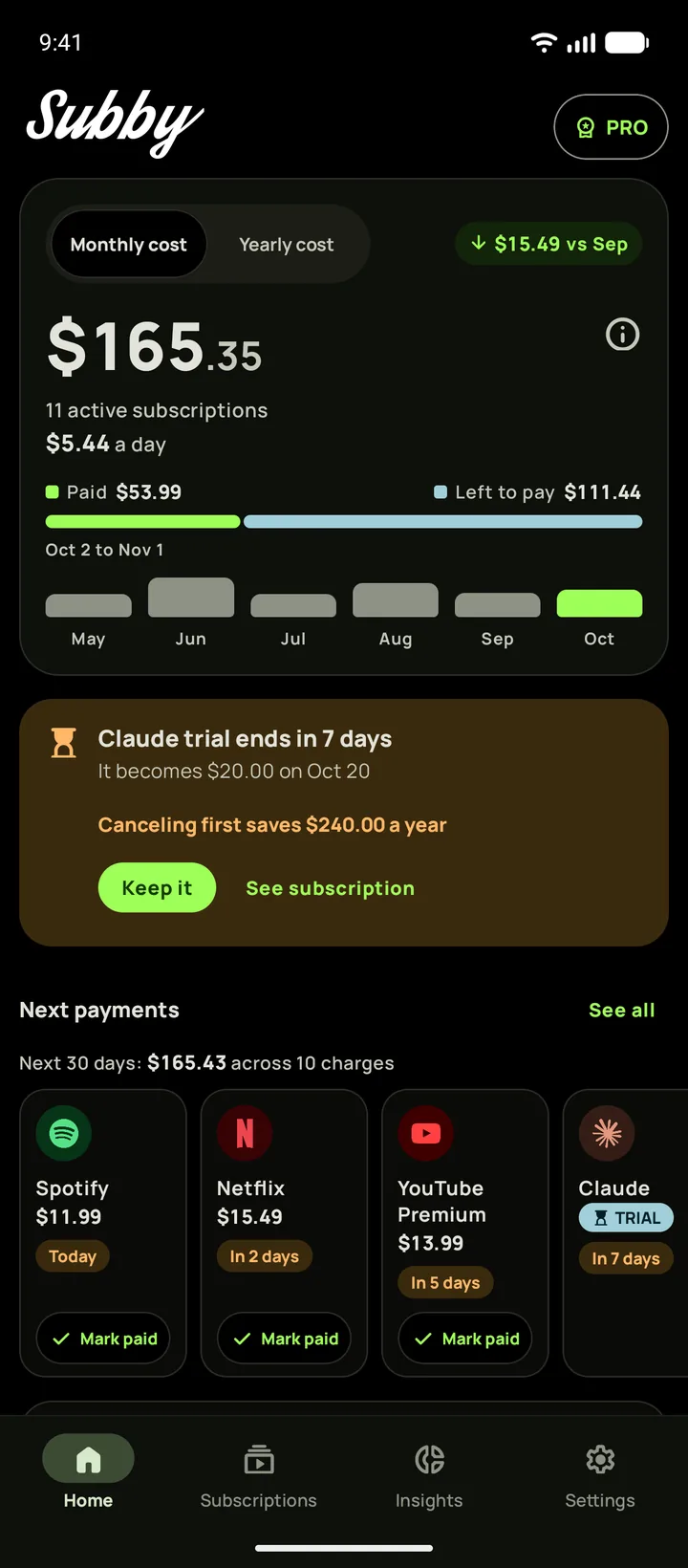
One list of what you pay for
Choose from more than 600 services with their logos built in, or type your own, and give each the price, the billing cycle and the next charge date. The cycle can be weekly, monthly, yearly or custom, up to every three years, in any of 46 currencies.
Home leads with this month's total and what it costs you a day, splits it into paid and still to come, and lines up the next payments as cards you mark paid in place. Tracking is free, with ads, and you can add as many subscriptions as you like.

Reminders that survive a restart
Set the lead time per subscription, from the same day to a week ahead or a custom lead time, and pick the hour reminders arrive. Subby schedules them again after the phone restarts, after the clock or the time zone changes and after an app update, so a reboot never costs you a warning.
Each reminder names the amount, the card and the cycle, with Mark as paid and Remind me tomorrow on the notification. Leave it unpaid and Subby keeps reminding you for up to a week. Turn on Lock notifications and a stray swipe can't clear one before you have dealt with it. How the reminders work.

Insights, free for everyone
All four sections of Insights are free.
- Overview. Your monthly and yearly commitment, what is left of your budget before payday, and where the money goes by category or by payment method.
- Trends. Which prices crept up against a year ago, a thirteen week forecast, the coming twelve months against the past twelve, and a heatmap of every renewal, day by day.
- Services. The lifetime cost of each subscription, and Wins, the money that cancelling and pausing have saved.
- Signals. A price rise to review, missed months, a double charge and stale exchange rates.
Export your payment history as a CSV file whenever you want the raw numbers. Insights, section by section.


Know when a free trial ends
A trial goes in with its end date and the price it becomes. It stays out of your monthly total until it converts, and wears a TRIAL chip on Home and on the widget. A week before it ends, Home puts up a card with what cancelling would save in a year and a Keep it button. The reminder arrives before the first charge.
Budget by payday
Set the day you get paid and a monthly budget, and you budget by paycheck instead of by calendar month. Home counts your pay period, and Insights shows what renews before the money lands and how much of the budget is left.
Material with a true black dark theme
Subby on Android uses Material, with a light theme or a dark one that is true black, so an OLED screen switches those pixels off. You can also pick the app's language inside Subby, whatever the phone is set to.
Subby runs on Android 11 or later. It started here, on Google Play in December 2017, and the iPhone version followed in 2026.

A resizable subscription tracker widget and shortcuts on the icon
The home screen widget changes layout as you drag its edges, from one card for the next payment to a scrolling list with this month's total under it. Each widget gets its own theme and shows everything, the next five or one category, and a tick on a row marks that payment paid. The widget is part of PRO. The Android widget, explained.
Touch and hold the Subby icon for three shortcuts: Add subscription, Open payments log and Search subscriptions.

A Drive backup that restores on an iPhone too
With PRO, Subby backs up to your own Google Drive by itself, daily, weekly or monthly, weekly by default, and keeps the last three. Only you can read them, and we never hold a copy.
Because the backup lives in your Drive, it restores on any Android phone or iPhone signed in to the same account. Move to an iPhone and your list moves with you.

A subscription manager app with no bank login and no monthly fee
Subby never connects to your bank, so there is no account to create and no transaction feed to hand over. You do the adding, and Subby works only from what you put on the list.
The free app tracks everything, with ads, Insights included. PRO is a single purchase on Google Play that does not renew. It removes the ads and adds the widget, automatic backup, screenshot import and icon requests. The unlock stays with Google Play, so on an iPhone it is a separate purchase, while your list crosses over through the Drive backup.
Cancelling something you found on the list? How to cancel subscriptions on Google Play.
Works on
Android phones Android 11 or later, with Material and a resizable widget. 
iPhone iOS 18.6 or later, with Liquid Glass on iOS 26 or Material. 
iPhone Duo, open Home and Insights across both panels. 
iPhone Duo, closed A compact Home on the outer panel.
- With PRO, your list moves between iPhone and Android through a backup to your own Google Drive.
- PRO stays with the store that sold it.
- Home screen widgets come with PRO on Android and on iPhone.
Know exactly where your money goes.
Free · No account · No bank login