Subby vs Subscription Stopper
Subscription Stopper, from inMarket Media, sets out to find the subscriptions you already pay for and shows you how to cancel each one, with a Premium plan that does the cancelling. Subby takes the other route. You add each subscription yourself, nothing connects to your bank, and a reminder arrives before every charge. Here is how the two compare, from their own listings.

What Subscription Stopper does well
Subscription Stopper is built around finding. Its App Store listing leads with a “Subscription Finder: Uncover hidden subscriptions and manage them all in one centralized hub.” If you can't name everything that charges you, an app that looks for it does something no manual tracker can. The free version also shows you how to cancel each subscription yourself, and its Google Play listing makes a point of cost: “Why add another subscription when you are trying to remove subscriptions?” It runs on Android and on iPhone, and the developer has updated it through 2025.
Subby and Subscription Stopper, side by side
| Subby | Subscription Stopper | |
|---|---|---|
| How subscriptions get in | You add them, from 600+ built-in services or, with PRO, from a screenshot. About twenty seconds each. | A Subscription Finder to “uncover hidden subscriptions”. App Store listing verified Oct 18, 2026 |
| Bank connection | Never asked for. | Version 1.9.0 notes “Refined handling of bank accounts”, and inMarket's privacy policy says some of its apps “allow you to link to your banking or payment card accounts via a third party provider”. App Store listing · inMarket privacy policy verified Oct 18, 2026 |
| Cancelling a service | Subby reminds you before the charge, and you cancel with the provider. Our cancel guides walk through each one. | Cancel instructions in the free version. Premium adds “Cancel for Me (Unlimited)”, per the version 1.9.1 notes. Google Play listing · App Store listing verified Oct 18, 2026 |
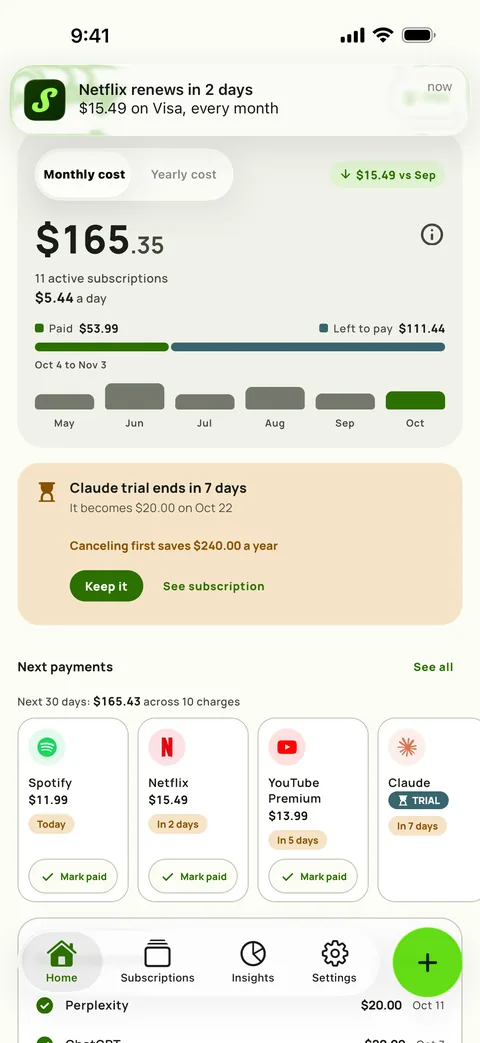
| Before a charge | A reminder at the lead time you pick, from the same day to a week ahead or any custom lead time. It names the amount, the card and the cycle, with Mark as paid on the notification. | The listings describe an overview of renewal dates and, on Premium, “Money Saving Alerts” about discounts and deals. Neither describes a reminder before each charge. Google Play listing · App Store listing verified Oct 18, 2026 |
| Free trials | A trial carries its end date and the price it becomes, with a reminder before it converts. | Neither listing mentions free trials. App Store listing · Google Play listing verified Oct 18, 2026 |
| Paying | Free with ads. PRO is one payment that removes the ads and adds screenshot import, cloud backup and the widget. | Free with ads. Premium removes them and is sold as monthly and annual in-app purchases. App Store listing verified Oct 18, 2026 |
| Data used to track you, per the App Store label | Purchases, Identifiers and Usage Data. Your subscription list stays on your phone, with optional backups to your own iCloud or Google Drive. | Purchases, Contact Info, User Content, Identifiers, Usage Data and Other Data. App Store listing verified Oct 18, 2026 |
| Platforms | Android and iPhone. | Android, and iPhone with iOS 15 or later. App Store listing · Google Play listing verified Oct 18, 2026 |
Is Subscription Stopper safe?
It is one of the questions people type next to its name, and we are not the ones to answer it. A competitor's verdict is worth little, and so is a single review. What we can do is point at the public record. The App Store privacy label is the developer's own declaration, and Apple notes that it “has not been verified by Apple.” The seller is inMarket Media, and inMarket's privacy policy includes a notice that “InMarket may engage in targeted advertising (including sharing for targeted advertising) that may be considered sales of personal information.” Read the label and the policy before you link a bank account to any app, ours included.
What Subby does differently
- Nothing to connect. No bank login and no account. The trade is that Subby only knows what you add, so you build the list once from your statements. Finding subscriptions on your bank statement shows how.
- A reminder before every charge. You pick the lead time for each subscription and, in Settings, the hour reminders arrive. A payment left unpaid keeps reminding you for up to a week.
- Trials tracked to the day. A trial stays out of your total until it converts, and the reminder comes before the first charge.
- Insights, free. Twelve months of real spending, price creep per service, the year ahead and what cancelling has saved you.
- PRO, once. One payment through Google Play or the App Store, with no monthly plan to add to the list you are trying to shorten.
Choose Subscription Stopper if…
you would rather have an app look for your subscriptions than list them yourself, and you want cancel instructions, or Premium's Cancel for Me, in the same place.
Choose Subby if…
you don't want to connect a bank, you want a reminder before every charge with the amount on it, and you would rather pay once than add another monthly plan.
Subscription Stopper is a trademark of its owner, named here for factual comparison only. We read its facts off its US App Store and Google Play listings and inMarket's privacy policy, and Subby's privacy label off our own App Store listing, on October 18, 2026.
Test the reminder on one subscription
Add the one that renews next and watch the reminder arrive before the charge. Free with ads, no account, no bank login, and PRO is one payment.

Free · No account · No bank login